eFaktura.nl Integration with the Peppol Network

The eFaktura.nl application has been fully integrated with the Peppol network, meeting the new invoicing standard for businesses in Belgium. After a one-time company data verification, users can send and receive Peppol e-invoices without installing any additional tools. Every paid user of the eFaktura.nl application can use the Peppol integration at no extra cost.
How to activate Peppol in eFaktura.nl?
Go through a one-time verification process. Once completed, your eFaktura.nl account will be registered on the Peppol network as both a sender and receiver of e-invoices. The entire verification process is conducted online, takes just a few minutes, and is carried out by an external, certified Peppol partner. All data shared during the process is secure and not stored by eFaktura.nl.
What is needed for verification?
- Full name
- KBO number and VAT number (BE…) – if previously entered in the system, these will appear automatically
- IBAN number – required so the recipient knows where to make the payment
In the app, go to Settings → Peppol tab → choose: Verification
How does identity verification work?
- Prepare a valid ID document (passport or national ID card)
- Take a real-time selfie – the system will compare it to the ID document
- In some cases, additional data confirmation may be required
Once the process is complete, your Peppol status will be active, meaning you can send unlimited invoices to any number of clients.
What is needed for verification?
- Full name
- KBO number and VAT number (BE…) – if previously entered in the system, these will appear automatically
- IBAN number – required so the recipient knows where to make the payment
In the app, go to Settings → Peppol tab → choose: Verification
How does identity verification work?
- Prepare a valid ID document (passport or national ID card)
- Take a real-time selfie – the system will compare it to the ID document
- In some cases, additional data confirmation may be required
Once the process is complete, your Peppol status will be active, meaning you can send unlimited invoices to any number of clients.
Note: Verification is only required once. If you later change your company details (e.g. IBAN), the system may prompt a brief re-verification – but the process is simplified.
How does Peppol invoicing work in eFaktura.nl?
1. The invoicing process remains unchanged
You create an invoice as usual: enter client details, products/services, VAT, and payment due date. Check the preview to ensure all data is correct.
Tip: Make sure your client is a Belgian company with a valid VAT/KBO number and that you have entered your IBAN and payment term.
2. Sending the e-invoice
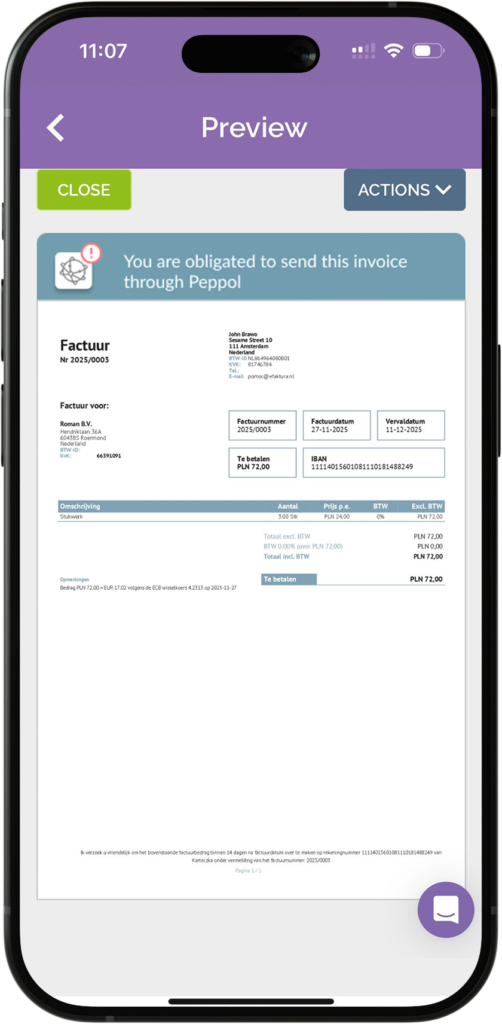
If your client is a Belgian company, you will see the mandatory option SEND VIA PEPPOL in the invoice actions. Your client will also receive the invoice via email in PDF and XML formats.
If your client is a Belgian company not connected to Peppol, you will see a note indicating this, and the only available option will be: SEND VIA EMAIL.
For other clients – individuals or companies outside Belgium – the available invoice sending option is: SEND VIA EMAIL.
Tip: The system will automatically detect whether the client qualifies for Peppol delivery, and you’ll see a notification on your app screen.
3. Monitor invoice status
After clicking “Send”, the invoice list will show:
- For Peppol: Sent, In progress, Sending error, Not sent
- For email: Sent, Sending error
The invoice list also includes an icon indicating whether the invoice was successfully delivered via Peppol.
4. Receiving cost e-invoices
Incoming e-invoices are automatically sent to the EXPENSES section. The system converts them into a readable preview, and the data from these invoices is automatically included in your statistics.
You will also receive an email notification when your company receives an electronic invoice.
Cost e-invoice handling is available in the PRO plan.
Corrective e-invoices
Invoices sent via Peppol cannot be edited or deleted. This is a security requirement of the new invoicing standard.
If you notice an error after sending an invoice, select the option: Issue credit note.
The system will automatically:
- Generate a correction invoice with appropriate negative values
- Allow sending it via Peppol to the same recipient
- Reflect the correction in statistics and reports
Disconnecting from the Peppol network
At any time, you can disconnect from the Peppol network in eFaktura.nl via Settings → Peppol. If you do so, and still wish to meet the new standard requirements, you’ll need to connect to Peppol through a different access point – otherwise, you won’t be able to issue electronic invoices compliant with the regulations.
Need help?
Contact our support team:
- In-app messenger
- Email: [email protected]