Enhanced EXPENSES function

The enhanced EXPENSES function is more than just a visual update. It introduces a new way of working with business expenses and expense documents. The improved structure and navigation make it easier to add documents, find information, and manage company expenses.
Key improvements:
- intelligent data extraction from expense documents using AI
- document scanning and image enhancement for photos of receipts and invoices
- expense categorization with your own custom category database
- a redesigned expenses list with filters and payment status
- expanded expense statistics and reporting
Intelligent data extraction from documents
The biggest change concerns the way expense data is entered into the system.
After adding an invoice or receipt, the system automatically:
- reads data from the document
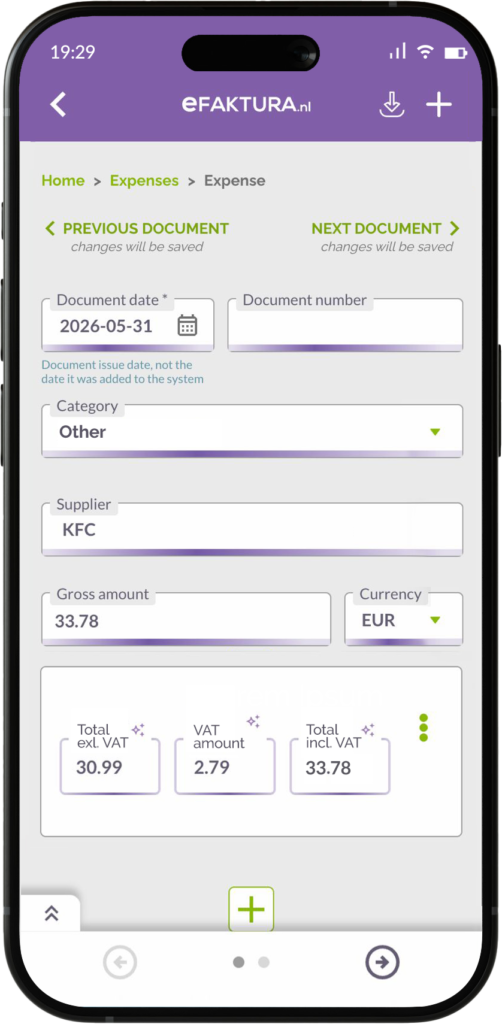
- fills in net, gross and VAT amounts
- recognizes supplier information
- prepares the document for further processing
The system uses AI technology to analyze documents and automatically complete information that previously had to be entered manually.
All automatically extracted data is first presented for your verification. This means that instead of typing information yourself, you simply review and confirm it.
The data is immediately ready for further use, while a larger amount of complete information makes it easier to analyze expenses and monitor spending later on.
Improved readability of documents from photos
The system also supports you when adding photos of receipts and expense documents.
It automatically:
- improves document readability
- removes unnecessary background elements
- prepares the image for accurate data extraction

As a result, even a quick photo taken with your phone can be successfully processed.
You can add expenses in several ways: by taking a photo, uploading a file, sending it to [email protected], or automatically importing e-invoices through Peppol and KSeF.
Expense categories
You can now assign every expense to a category while adding the document.
Choose from predefined categories or create your own category database tailored to the way your business operates.
Categories help you build a structured overview of company spending and clearly see where money is being spent. The more consistently you categorize expenses, the more valuable your reports and statistics become.
New expenses list – quicker overview and better control
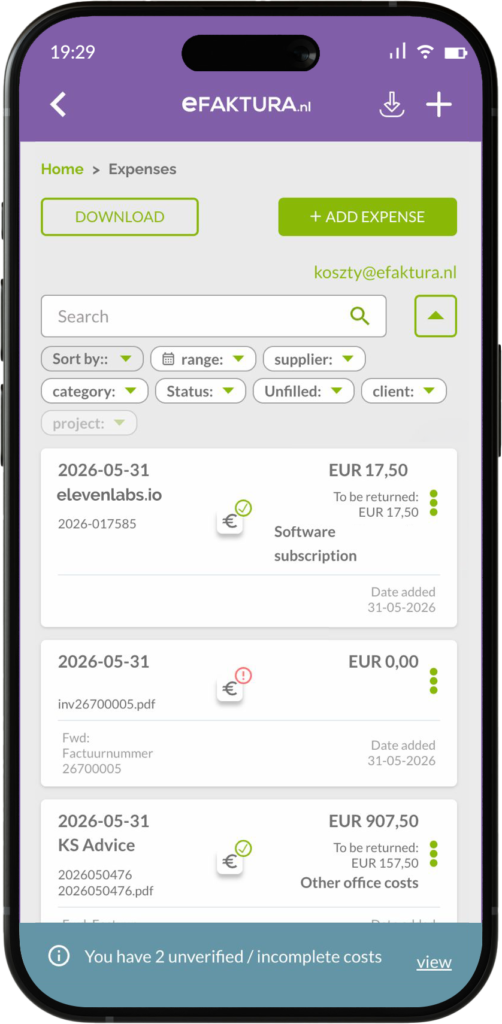
The redesigned expenses list helps you manage a growing number of documents more efficiently.
At a glance, you can see:
- a clear overview of expenses
- payment status
- quick access to expense details
This makes it easier to stay on top of your spending and find information whenever you need it.
Filtering and searching
The expenses list now includes advanced filtering options. You can work with data based on:
- date range
- category
- customer
- project
- status
This allows you not only to find specific documents faster, but also to analyze expenses from different perspectives. Instead of browsing through all records, you can focus on the information that matters at a given moment.
Expense statistics – better insight into spending
Alongside the improvements to the EXPENSES function, a new expense chart has been added to the STATISTICS section.
Every expense now contributes to your business insights.
The new chart allows you to analyze expenses by:
- category
- customer
- project
- time period
This helps you identify the areas generating the highest costs, monitor spending trends over time, and prepare more effectively for tax reporting.
Summary
The enhanced EXPENSES function minimizes manual work and provides more data for analysis.
The result is better organization of your expense documents, greater visibility into company spending, and more information to support informed business decisions.