VAT Verification When Issuing an Invoice
In accordance with EU regulations and the guidelines of the Belastingdienst, when issuing an invoice you must ensure that your customer has an active VAT number. Moreover, the tax authorities may request proof that you verified this at the time the invoice was issued.
In practice, many companies overlook this obligation, which may result in corrections, penalties, and loss of the right to deduct VAT. That is why at eFaktura.nl we have introduced automatic VAT verification of the recipient at the moment the invoice is issued – without copying numbers or taking any additional steps.
How does VAT verification work when issuing an invoice?
While issuing an invoice, the application automatically checks whether the recipient’s VAT number is active in the official VIES database (VAT Information Exchange System).
The system automatically:
- connects to the VIES database,
- checks the status of the customer’s VAT number,
- saves and archives the result with the exact date and time.
VAT Number Verification Confirmation
After issuing the invoice, you can download an additional PDF document confirming that the verification has been performed at any time. You will find it in the invoice history, available in the document preview.
The confirmation includes the VAT number, its status in the VIES database, and the date and time of verification.
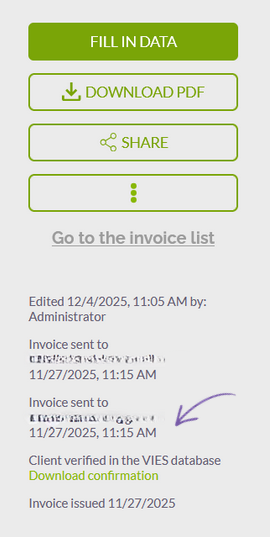
This document may serve as official evidence during a tax audit, in line with the recommendations of the European Commission and the Belastingdienst.
Full VAT Verification Automation – Only with Us
eFaktura.nl is the first invoicing software to offer fully automated VAT verification for every invoice, without manual copying, clicking, or using external tools.
Information about the VAT status and the time of verification is automatically stored and can serve as secure proof of compliance in the event of a tax inspection.